
전 편에서 Shader코드들을 분리해 클래스로 따로 만들었다
이제는 기본. obj 파일을 파싱 해서 VAO와 VBO 그리고 정점들에 대한 데이터 들을 클래스 단위로 분리해 보자!
Scop에서 가장 중요한 클래스가 아닐까 싶다
1. 왜 Model 클래스를 도입했나?
삼각형 그리기를 생각해 본다면 VAO, VBO, 위치 데이터, 셰이더 정보 등이 전부 흩어져 있다
이걸 하나로 묶지 않으면
- 각 객체마다 VAO/VBO를 일일이 관리해야 하고
- draw 호출마다 셰이더 바인딩도 반복하고
- 좌표, 색상, 메시 정보를 통합적으로 다루기 어렵다
그래서 이 모든 "하나의 그릴 대상"을 감싸는 클래스를 만들게 된 것이다.
2. Model 클래스는 어떤 책임을 가져야 할까?
처음에는 단순히 "정점 데이터를 갖는 그릇" 정도로만 생각했다
하지만 직접 만들다 보니, 역할이 꽤 많았다.
| 역할 | 설명 |
| 정점 데이터 보관 | VBO를 생성하고 데이터를 업로드 |
| VAO 설정 | 버텍스 레이아웃을 GPU에 정의 |
| 셰이더 연동 | Shader 클래스를 보관하고 사용 |
| 변환 행렬 저장 | 위치/회전/크기를 위한 model matrix |
| draw() 함수 | 화면에 실제로 그리는 로직 |
| OBJ 파싱 | .obj 파일을 파싱해서 정점 데이터, 메터리얼 등을 저장 |
즉, 단순 그리기 이상으로, 렌더링 파이프라인을 포괄하는 최소 단위가 되었다.
3. Model 클래스의 헤더부터 살펴보자
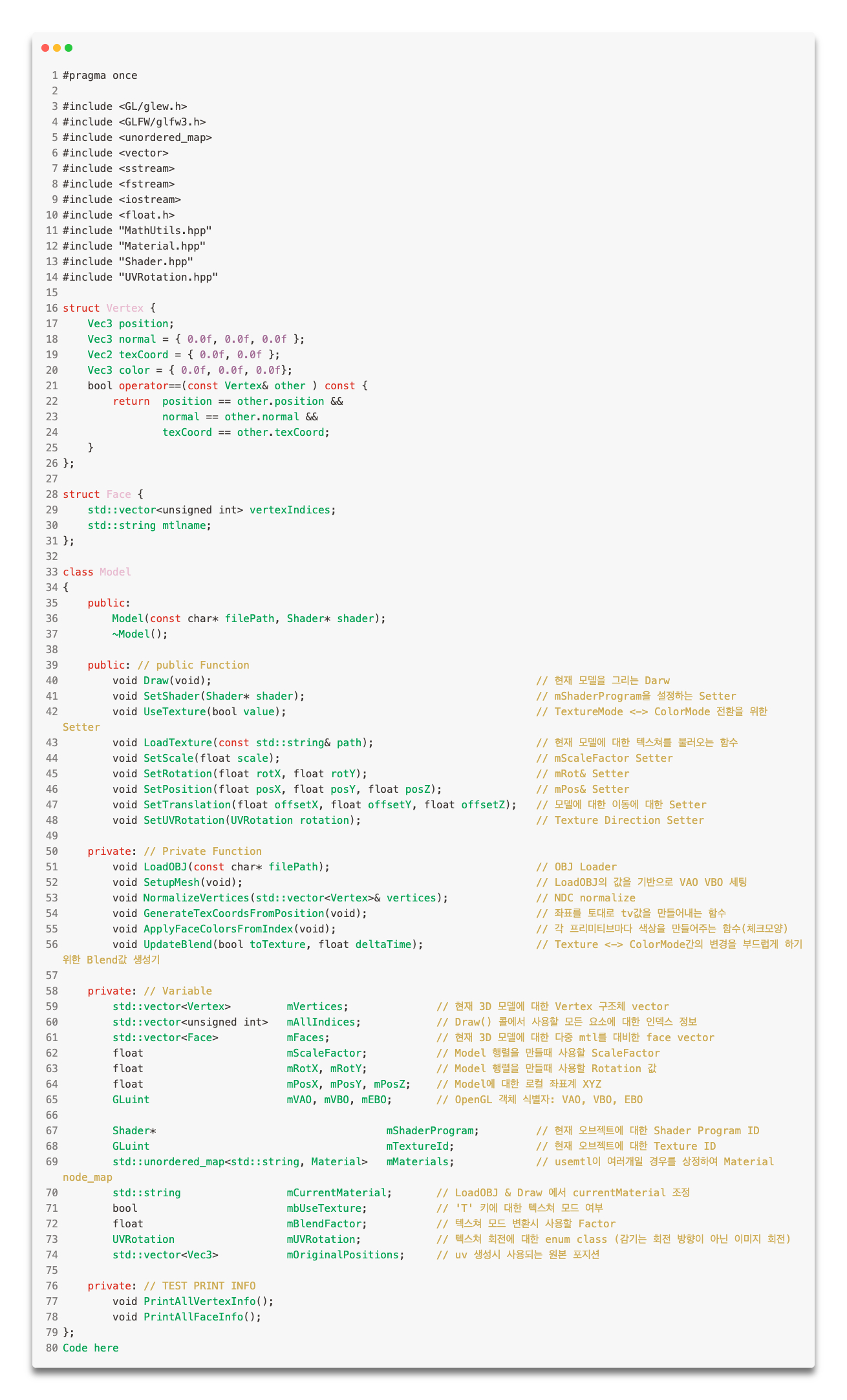
생각 보다 Model 클래스의 크기가 커졌다....
천천히 하나하나 설명을 작성해 보겠습니다!
1. 생성자
Model::Model(const char* filePath, Shader* shader)
: mShaderProgram(shader)
, mScaleFactor(1.0f)
, mRotX(0.0f), mRotY(0.0f)
, mPosX(0.0f), mPosY(0.0f), mPosZ(0.0f)
, mbUseTexture(false)
, mBlendFactor(0.0f)
, mUVRotation(UVRotation::None)
{
	LoadOBJ(filePath);
	SetupMesh();
	LoadTexture("resources/sample.png");
}
생성자에서 간단하게 초기화해야 하는 멤버 변수들을 초기화하고 Model 클래스의 핵심이라고 할 수 있는 부분인 LoadOBJ로
넘 거 가게 된다.
2. LoadOBJ
void Model::LoadOBJ(const char* filePath)
{
	std::ifstream file(filePath);
	if (!file.is_open())
	{
		std::cerr << "Failed to open OBJ file: " << filePath << std::endl;
		return;
	}
	std::vector<Vec3>	temp_V;
	std::vector<Vec2>	temp_Vt;
	std::vector<Vec3>	temp_Vn;
	std::vector<Vec3>	temp_color;
	bool				hasTexCoord;

	std::string line;
	while (std::getline(file, line))
	{
		std::istringstream iss(line);
		std::string prefix;
		iss >> prefix;
		// mtl 파일 파싱
		if (prefix == "mtllib")
		{
			std::string mtlFilename;
			iss >> mtlFilename;
			mMaterials = MTLLoader::Load("resources/" + mtlFilename);
			std::cout << mtlFilename << std::endl;
		}
		else if (prefix == "v") // v 1.0123, 2.123123, -6.1235 -> 정점 좌표 정보일 경우
		{
			Vec3 v;

			iss >> v.x >> v.y >> v.z;
			temp_V.push_back(v);
		}
		else if (prefix == "vt") // vt 0~1, 0~1 -> TextureCoord일 경우
		{
			Vec2 vt;
			iss >> vt.x >> vt.y;
			temp_Vt.push_back(vt);
			hasTexCoord = true;
		}
		else if (prefix == "vn") // vn 1, 2, 5 -> Normal 정보일 경우
		{
			Vec3 vn;
			iss >> vn.x >> vn.y >> vn.z;
			temp_Vn.push_back(vn);
		}
		else if (prefix == "usemtl") // v, vn, vt 정보가 모두 처리 완료 된 후 Usemtl -> 이후 f들에게 적용할 mtl 명
		{
			iss >> mCurrentMaterial;
		}
		else if (prefix == "f") // f 정보가 나오면
		{
			Face face;
			face.mtlname = mCurrentMaterial;
			std::string vertexStr;
			while (iss >> vertexStr)
			{
				int vIdx = -1, vtIdx = -1, vnIdx = -1;
				size_t firstSlash = vertexStr.find('/'); // f 1/2/3 에서 첫번째 슬레쉬 찾기
				size_t secondSlash = vertexStr.find('/', firstSlash + 1); // 두번째 슬레쉬 찾기

				if (firstSlash == std::string::npos)
				{
					vIdx = std::stoi(vertexStr) - 1;
				}
				else if (secondSlash == std::string::npos)
				{
					vIdx = std::stoi(vertexStr.substr(0, firstSlash)) - 1;
					vtIdx = std::stoi(vertexStr.substr(firstSlash + 1)) - 1;
				}
				else if (secondSlash == firstSlash + 1)
				{
					vIdx = std::stoi(vertexStr.substr(0, firstSlash)) - 1;
					vnIdx = std::stoi(vertexStr.substr(secondSlash + 1)) - 1;
				}
				else
				{
					vIdx = std::stoi(vertexStr.substr(0, firstSlash)) - 1;
					vtIdx = std::stoi(vertexStr.substr(firstSlash + 1, secondSlash - firstSlash - 1)) - 1;
					vnIdx = std::stoi(vertexStr.substr(secondSlash + 1)) - 1;
				}

				Vertex v;
				v.position = temp_V[vIdx];
				if (vtIdx >= 0 && temp_Vt.size() != 0)
					v.texCoord = temp_Vt[vtIdx];
				if (vnIdx >= 0 && temp_Vn.size() != 0)
					v.normal = temp_Vn[vnIdx];

				mVertices.push_back(v);
				unsigned int index = mVertices.size() - 1;
				face.vertexIndices.push_back(index);
			}
			if (face.vertexIndices.size() == 3)
			{
				mFaces.push_back(face);
			}
			else if (face.vertexIndices.size() == 4)
			{
				Face f1, f2;
				f1.mtlname = face.mtlname;
				f1.vertexIndices = { face.vertexIndices[0], face.vertexIndices[1], face.vertexIndices[2] };

				f2.mtlname = face.mtlname;
				f2.vertexIndices = { face.vertexIndices[0], face.vertexIndices[2], face.vertexIndices[3] };

				mFaces.push_back(f1);
				mFaces.push_back(f2);
			}

		}
	}
	for (const auto& v : mVertices)
		mOriginalPositions.push_back(v.position);
	file.close();
	if (!hasTexCoord)
	{
		GenerateTexCoordsFromPosition();
	}
	NormalizeVertices(mVertices); // NDC 좌표계로
	ApplyFaceColorsFromIndex();
	PrintAllVertexInfo();
	// PrintAllFaceInfo();
	// 정점 및 인덱스 저장
}
전체 흐름 요약
- . obj 파일 열기
- v, vt, vb, f , usemtl, mtllib 등 접두어별로 처리
- 각 줄을 파싱해 점검, 텍스쳐 좌표, 노멀 벡터 등 임시 저장
- f 라인에서 실제 정점 조합 생성 및 mVetices/mFaces 구성
- 정점 정규화, 텍스쳐 좌표 자동 생성, 색상 정용 등 후처리
섹션 상세 설명
1. 파일 열기
std::ifstream file(filePath);
if (!file.is_open())
ifstream으로 파일을 연뒤 열리지 않으면 경고 출력 후 리턴.
2. 정점/텍스처/ 노멀 저장용 임시 버퍼
std::vector<Vec3>	temp_V;
std::vector<Vec2>	temp_Vt;
std::vector<Vec3>	temp_Vn;
. obj는 f라인보다 v 라인이 먼저 오므로 일단 버퍼에 넣어둔다.
정점마다 (v/vt/vn) 조합이 다르므로 나중에 매칭해야 한다.
3.mtlib & usemtl 처리
if (prefix == "mtllib")
{
 // 재질 로딩
}
else if (prefix == "usemtl")
{
 // 현재 페이스에 적용할 재질 이름 저장
}
.obj 파일은. mtl 파일을 함께 사용하며, 재질 (Material) 이름은 Face에 저장된다.
그럼 나중에 렌더링 할 때 해당 재질의 색상을 불러올 수 있다.
4.f(face) 파싱
이게 핵심 부분이라고 생각한다, 각 정점은 다음 4가지 방식으로 등장할 수 있다.
| 형식 | 의미 |
| v | 정점 인덱스 |
| v/vt | 정점 + 텍스처 좌표 |
| v//vn | 정점 + 노멀 |
| v/vt/vn | 정점 + 텍스처 + 노멀 |
이를. find('/')로 판단하고 각 파트를 분리해 index로 처리한다.
5. Vertex 객체 생성 및 mVertices 저장
Vertex v;
v.position = temp_V[vIdx];
if (vtIdx >= 0) v.texCoord = temp_Vt[vtIdx];
if (vnIdx >= 0) v.normal = temp_Vn[vnIdx];
mVertices.push_back(v);- 각각의 Face는 Vertex들의 index를 참조하여 만든다.
- . obj는 인덱스 기반 구조이기 때문에, Vertex 중복이 발생할 수 있다.
- 여기선 간단하게 mVertices.push_back()하며 인덱스를 추적해 넣는다.
6. 4 각형 face 삼각형 분해
if (face.vertexIndices.size() == 4) {
	// 0-1-2 / 0-2-3 으로 분해
}
. obj에서 사각형(f 1 2 3 4) 구조는 삼각형 두 개로 쪼개줘야 한다.
현재 구조에서는 그래야 OpenGL이 이해할 수 있다.
7. 텍스처 좌표 없을 경우 자동 생성
if (!hasTexCoord) {
	GenerateTexCoordsFromPosition();
}
텍스처 좌표가 없는. obj 파일도 많기 때문에
그럴 경우 정점 위치 기반으로 UV를 강제로 생성해 준다.
8. 정규화 및 색상 적용
NormalizeVertices(mVertices);
ApplyFaceColorsFromIndex();- 정점 위치를 OpenGL의 -1.0 ~ 1.0 영역으로 스케일링 (NDC 대응)
- 각 Face마다 색상을 지정해 색상을 가진 렌더링이 가능하도록 한다 (체크무늬)
3.SetUpMesh
void Model::SetupMesh(void)
{
	glGenVertexArrays(1, &mVAO);
	glGenBuffers(1, &mVBO);
	glGenBuffers(1, &mEBO);

	glBindVertexArray(mVAO);

	glBindBuffer(GL_ARRAY_BUFFER, mVBO);
	glBufferData(GL_ARRAY_BUFFER, mVertices.size() * sizeof(Vertex), &mVertices[0], GL_STATIC_DRAW);
	/*
		Vertex
		->	float * 3 : position
			float * 3 : normal
			float * 2 : texcoord
			flaot * 3 : color
	*/
	glBindBuffer(GL_ELEMENT_ARRAY_BUFFER, mEBO);
		// 각 face의 인덱스를 모아 하나의 인덱스 버퍼 생성
	mAllIndices.clear();
	for (const Face& face : mFaces) {
		mAllIndices.insert(mAllIndices.end(), face.vertexIndices.begin(), face.vertexIndices.end());
	}
	glBufferData(GL_ELEMENT_ARRAY_BUFFER, mAllIndices.size() * sizeof(unsigned int), mAllIndices.data(), GL_STATIC_DRAW);

	glVertexAttribPointer(0, 3, GL_FLOAT, GL_FALSE, sizeof(Vertex), (void*)offsetof(Vertex, position));
	glEnableVertexAttribArray(0);
	glVertexAttribPointer(1, 3, GL_FLOAT, GL_FALSE, sizeof(Vertex), (void*)offsetof(Vertex, normal));
	glEnableVertexAttribArray(1);
	glVertexAttribPointer(2, 2, GL_FLOAT, GL_FALSE, sizeof(Vertex), (void*)offsetof(Vertex, texCoord));
	glEnableVertexAttribArray(2);
	glVertexAttribPointer(3, 3, GL_FLOAT, GL_FALSE, sizeof(Vertex), (void*)offsetof(Vertex, color));
	glEnableVertexAttribArray(3);
	glBindVertexArray(0);
}
전체 흐름 요약
- 버퍼 객체 (VAO, VBO, EBO) 생성
- 정점 데이터 GPU에 업로드 (glBufferData)
- 인덱스 데이터 생성 및 업로드
- 정점 속성 포인터 설정 (glVertexAttribPointer)
- 마무리 정리 (glBindVertexArray(0))
섹션 상세 설명
1. 버퍼 객체 생성
glGenVertexArrays(1, &mVAO);
glGenBuffers(1, &mVBO);
glGenBuffers(1, &mEBO);- VAO: 정점 배열 객체 (Vertex Array object)
- VBO: 정점 버퍼 객체 (Vertex Array object)
- EBO: 인덱스 버퍼 객체 (Element Buffer object)
2. VAO 바인딩 시작
glBindVertexArray(mVAO);
이제부터의 모든 설정은 VAO에 저장된다.
즉, 한 번만 설정해 두면 glBindVertexArray(mVAO)만 해도 그 설정이 복구됨
3. 정점 데이터 GPU에 업로드
glBindBuffer(GL_ARRAY_BUFFER, mVBO);
glBufferData(GL_ARRAY_BUFFER, mVertices.size() * sizeof(Vertex), &mVertices[0], GL_STATIC_DRAW);- GL_ARRAY_BUFFER는 정점 데이터를 위한 버퍼다.
- Vertex는 구조체로서 다음과 같은 레이아웃을 가진다.
struct Vertex {
	Vec3 position;   // 3 floats
	Vec3 normal;     // 3 floats
	Vec2 texCoord;   // 2 floats
	Vec3 color;      // 3 floats
};
총 11 floats = 44 bytes 짜리 구조다.
OpenGL에게 이 구조를 설명해야 하며, mVertices.size만큼 설정해야 한다.
4. 인덱스 버퍼 구성 (EBO)
mAllIndices.clear();
for (const Face& face : mFaces) {
	mAllIndices.insert(mAllIndices.end(), face.vertexIndices.begin(), face.vertexIndices.end());
}
glBindBuffer(GL_ELEMENT_ARRAY_BUFFER, mEBO);
glBufferData(GL_ELEMENT_ARRAY_BUFFER, mAllIndices.size() * sizeof(unsigned int), mAllIndices.data(), GL_STATIC_DRAW);- 각 Face는 세 개의 정점 인덱스를 가진다 (삼각형)
- 이 인덱스들을 하나의 벡터로 모아 glDrawElemets용으로 만든다.
- GL_ELEMENT_ARRAY_BUFFER는 EBO의 명칭이다.
5. 정점 속성 포인터 설정
glVertexAttribPointer(0, 3, GL_FLOAT, GL_FALSE, sizeof(Vertex), (void*)offsetof(Vertex, position));
glEnableVertexAttribArray(0);
glVertexAttribPointer(1, 3, GL_FLOAT, GL_FALSE, sizeof(Vertex), (void*)offsetof(Vertex, normal));
glEnableVertexAttribArray(1);
glVertexAttribPointer(2, 2, GL_FLOAT, GL_FALSE, sizeof(Vertex), (void*)offsetof(Vertex, texCoord));
glEnableVertexAttribArray(2);
glVertexAttribPointer(3, 3, GL_FLOAT, GL_FALSE, sizeof(Vertex), (void*)offsetof(Vertex, color));
glEnableVertexAttribArray(3);
glBindVertexArray(0);
- layout 0 -> position: 3개의 float (x, y, z)
- layout 1 -> normal: 3개의 float
- layout 2 -> texCoord: 2개의 float
- layout 3 -> color: 3개의 float
glVertexAttribPointer(index, size, type, normalize, stride, offset);| 항목 | 설명 |
| index | 셰이더에서 layout(location = index)와 매칭됨 |
| size | 몇 개의 요소 (position은 3, texCoord는 2등) |
| type | GL_FLOAT |
| normalize | 정규화 여부 (일반적으로 false) |
| stride | 하나의 정점 전체 크기 |
| offset | 구조체 내 해당 필드까지의 거리 |
6. 마무리
glBindVertexArray(0);VAO를 바인딩 해제함으로써 설정을 마감한다.
이제 나중에 Draw() 함수에서 glBindVertexArray(mVAO)만 하면 바로 사용 가능한 상태가 되었다.
4. Draw() 함수
void Model::Draw(void)
{
	mShaderProgram->Use();
	glBindVertexArray(mVAO);

	float view[16];
	createLookAtMatrix({0, 0, 3}, {0, 0, 0}, {0, 1, 0}, view);

	float projection[16];
	createPerspectiveMatrix(45.0f, 1000.0f/1000.0f, 0.1f, 100.0f, projection);

	float model[16];
	setIdentityMatrix(model);

	float scaleMatrix[16] = {
		mScaleFactor, 0.0f, 0.0f, 0.0f,
		0.0f, mScaleFactor, 0.0f, 0.0f,
		0.0f, 0.0f, mScaleFactor, 0.0f,
		0.0f, 0.0f, 0.0f, 1.0f
	};
	float translate[16];
	createTranslationMatrix(mPosX, mPosY, mPosZ, translate);

	multiplyMatrix(model, scaleMatrix, model);
	rotateY(mRotY, model);
	rotateX(mRotX, model);
	multiplyMatrix(model, translate, model);

	UpdateBlend(mbUseTexture, 0.016f);

	mShaderProgram->SetMat4("model", model);
	// mShaderProgram->SetBool("useTexture",mbUseTexture);
	mShaderProgram->SetMat4("view", view);
	mShaderProgram->SetMat4("projection", projection);
	mShaderProgram->SetFloat("blendFactor", mBlendFactor);
	size_t indexOffset = 0;
	for (const Face& face : mFaces)
	{
		const auto it = mMaterials.find(face.mtlname);
		if (it != mMaterials.end())
		{
			const Material& mat = it->second;
			mShaderProgram->SetVec3("material.diffuse", mat.Kd.r, mat.Kd.g, mat.Kd.b);
			mShaderProgram->SetVec3("material.ambient", mat.Ka.r, mat.Ka.g, mat.Ka.b);
			mShaderProgram->SetVec3("material.specular", mat.Ks.r, mat.Ks.g, mat.Ks.b);
			mShaderProgram->SetFloat("material.shininess", mat.Ns);
		}
		glDrawElements(GL_TRIANGLES, 3, GL_UNSIGNED_INT, (void*)(indexOffset * sizeof(unsigned int)));
		indexOffset += 3;
	}
	if (mAllIndices.size() % 3 != 0) std::cerr << "⚠️ Broken EBO!" << std::endl;
	glBindVertexArray(0);
}
전체 흐름 요약
- 셰이더 활성화
- View, Projection, Model 행렬 구성 및 전달
- 재질 (Material) 속성 전달
- glDrawElements()로 실제 그리기
- VAO 해제
섹션 상세 설명
1. 셰이더 프로그램 활성화
mShaderProgram->Use();
glBindVertexArray(mVAO);
VAO를 바인딩함으로써 버퍼 세팅 정보를 불러오고,
셰이더 프로그램을 GPU에서 사용하도록 설정한다.
2.View Projection, Model 행렬 구성
float view[16];
createLookAtMatrix({0, 0, 3}, {0, 0, 0}, {0, 1, 0}, view);

float projection[16];
createPerspectiveMatrix(45.0f, 1000.0f/1000.0f, 0.1f, 100.0f, projection);- View: 카메라 위치를 기준으로 씬을 바라보는 시점 설정
- Projection: 원근 투영(FOV 45도, near/far 평면)
3. 모델 변환 적용
setIdentityMatrix(model);  // 초기화
multiplyMatrix(model, scaleMatrix, model); // 스케일
rotateY(mRotY, model);                     // 회전
rotateX(mRotX, model);
multiplyMatrix(model, translate, model);  // 이동
정점 데이터를 모델 공간 -> 월드 공간으로 변환한다.
이 과정은 행렬 곱 순서가 매우 중요함
4. 유니폼 값 전달
mShaderProgram->SetMat4("model", model);
mShaderProgram->SetMat4("view", view);
mShaderProgram->SetMat4("projection", projection);
mShaderProgram->SetFloat("blendFactor", mBlendFactor);
셰이더에서 사용하는 매트릭스들은 모두 유니폼으로 전달되며,
셰이더에서는 이걸 통해 gl_Position = projection * view * model * vec4(...) 형태로 변환하게 된다.
5. 재질 정보 전달 및 드로우 호출
for (const Face& face : mFaces)
{
	const auto it = mMaterials.find(face.mtlname);
	if (it != mMaterials.end())
	{
		const Material& mat = it->second;
		mShaderProgram->SetVec3("material.diffuse", mat.Kd.r, mat.Kd.g, mat.Kd.b);
		mShaderProgram->SetVec3("material.ambient", mat.Ka.r, mat.Ka.g, mat.Ka.b);
		mShaderProgram->SetVec3("material.specular", mat.Ks.r, mat.Ks.g, mat.Ks.b);
		mShaderProgram->SetFloat("material.shininess", mat.Ns);
	}
	glDrawElements(GL_TRIANGLES, 3, GL_UNSIGNED_INT, (void*)(indexOffset * sizeof(unsigned int)));
	indexOffset += 3;
}- material.diffuse, specular, ambient 등은 프래그먼트 셰이더에서 조명 연산에 사용된다.
- glDrawElements는 EBO에 있는 인덱스를 3개씩 참조하여 하나의 삼각형을 그림.
6. VAO 해제
glBindVertexArray(0);VAO 바인딩 해제!
다른 모델을 그릴 수 있도록 준비해 주는 단계.
'Dev > Grapics' 카테고리의 다른 글
| Scop 구현기 5편: 행렬과 사용 점 (0) | 2025.04.17 |
|---|---|
| Scop 구현기 3편: 셰이더 클래스를 만들기로 했다 (0) | 2025.04.11 |
| Scop 구현기 2편: VAO와 VBO의 세계 (0) | 2025.04.09 |
| Scop 구현기 1편: 윈도우 하나 띄우는 게 뭐라고 (Object Viewer) (0) | 2025.04.09 |
| Rasterization vs Ray Tracing (0) | 2025.04.09 |